Attestation Discord Bot
Overview

EthSign's AttestationBot is a Discord gatekeeping bot based on attestations. Server administrators choose a schema ID, and the bot verifies users who hold attestations from that schema. To get verified, a user creates an attestation with the chosen schema ID and signs a message with their wallet address to link their Discord account. Administrators can also require the attestation's Result field to be true. Once these checks pass, the user is granted the server's verification role and the access it defines.
Discord admin command reference
/register \ \ \ \ [attester]
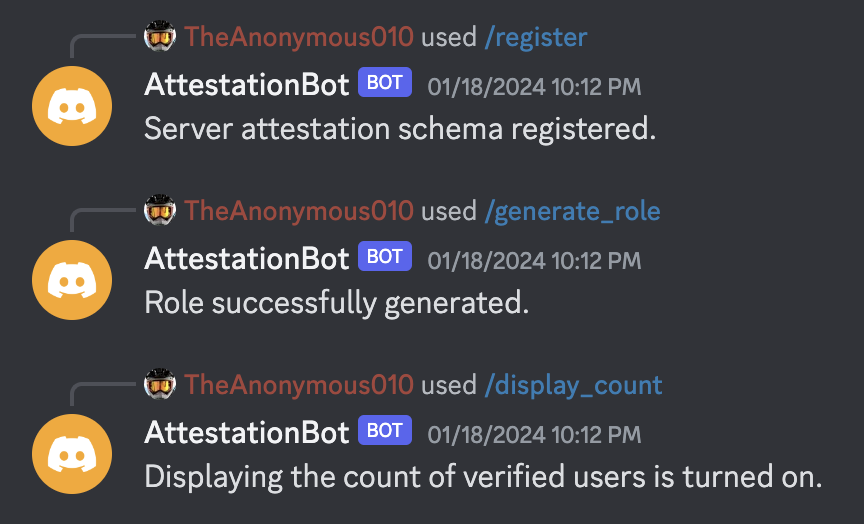
Registers attestation data for the server's verification. Requires testnet (true/false), mode (on-chain/off-chain), the schema ID for verification, and whether to check the Result field (true/false). Optionally, admins can supply an attester address to only query attestations created by that address (a trusted delegate address).
/generate_role [name]
Generates a pre-defined Discord role in the server with default permissions. If the name is blank, the role is named "Verified".
/set_role \
Sets the verification role to the role passed as an argument.
/display_count
If set to on, displays the number of verified users in the server.
User command reference
/verify
DMs the user a verification link. On success, the user is given the role. On failure, tells the user why (no role setup in server, no attestation linked to server, user already verified, and so on).
ID format (schema + attestation)
IDs are generated in the following format: {mode}_{chainType}_{chainId}_{id}
Example schema ID: onchain_evm_80001_0x3
Example attestation ID: onchain_evm_80001_0x11
Bot initialization
1. /register \ \ \ \ [attester]
Register the attestation-specific data for a server.
2. /generate_role or /set_role
Set the verified role for a server.
3. /display_count (optional)
Show the number of verified users in a server.
4. /verify
Users can now verify their Discord accounts to receive the verified role's permissions.
End user verification flow
- Run /verify and click the link provided by direct message.
- Connect MetaMask to the website.
- Click the "Verify" button and sign the relevant message in MetaMask.
- Return to Discord.
If the role is later removed from a verified Discord account, the user can run /verify again to get it back without additional verification.
Backend endpoint reference
/verify/:id
Validates the request body's message and signature for the given ID. On success, grants the user a role in the Discord server and returns the attestation ID for display. On failure, returns an error message.
/lookup/:id
Checks whether the interaction ID exists in the backend. On success, returns the Discord user's data for display on the frontend. On failure, returns an error message.
/interactions
Discord-specific endpoint that receives every bot command issued in a Discord server.
/status
Pings server uptime.
Relevant Sign Protocol code examples
Querying for attestations and parsing the response:
const endpoint = `${ATTESTATION_ENDPOINT}/index/attestations`;
// Use fetch() or axios to call the Sign Protocol indexing service:
const response = await AttestationRequest(
  endpoint,
  {
    method: "GET",
    // If we have an attester provided in the Discord Server's registration config,
    // we need to use it as the attester when querying. Otherwise, the recipient
    // (the address belonging to the user trying to verify themselves in Discord)
    // will be our attester. Use the recipient as the indexingValue (provided when
    // making an attestation) to query for the recipient when an attester is provided.
    params: attester
      ? {
          mode, // onchain/offchain
          schemaId, // {mode}_{chainType}_{chainId}_{id}
          attester: attester, // an address
          indexingValue: recipient.toLowerCase() // an address
        }
      : {
          mode, // onchain/offchain
          schemaId, // {mode}_{chainType}_{chainId}_{id}
          attester: recipient // an address
        }
  }
);

// Begin parsing the response from the indexing server.
if (!response.success) {
  return { success: false, message: response?.message ?? "Attestation query failed." };
}

// Check if there is no data matching our query.
if (response.data?.total === 0) {
  return { success: false, message: "No attestation for this address found." };
}

// Do something with the attestations found. We will "return" them in this example.
return {
  success: true,
  attestations: response.data.rows
};
Parsing the attestation data into a JSON Object:
import { decodeAbiParameters } from "viem";

// The attestations returned by the indexing service (`response.data.rows` above).
const attestations: any[] = [];

let dataObjects: any = [];
for (const att of attestations) {
  // No data to parse.
  if(!att.data) continue;

  // Use viem's decodeAbiParameters() to parse the data.
  // Note that this step may require slight modifications depending on the schema's
  // data type, such as nested tuples or parsing pure strings.
  const data = decodeAbiParameters(
    att.dataLocation === "onchain" ? att.schema.data : [{ type: "string" }],
    att.data
  );

  // Create a data object from the schema.
  const obj: any = {};
  data.forEach((item: any, i: number) => {
    obj[att.schema.data[i].name] = item;
  });

  // Add the obj to dataObjects.
  dataObjects.push(obj);
}

// Do something with the data objects we have recovered and populated in dataObjects.
// We can use the attestation data to determine if a user should be allowed into a
// Discord server based on some verification criteria, such as requiring an
// attestation's data to contain a field named "Result" with a value of "true".