Data Storage
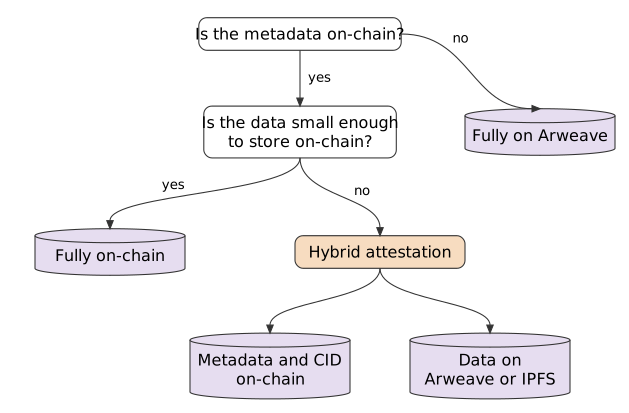
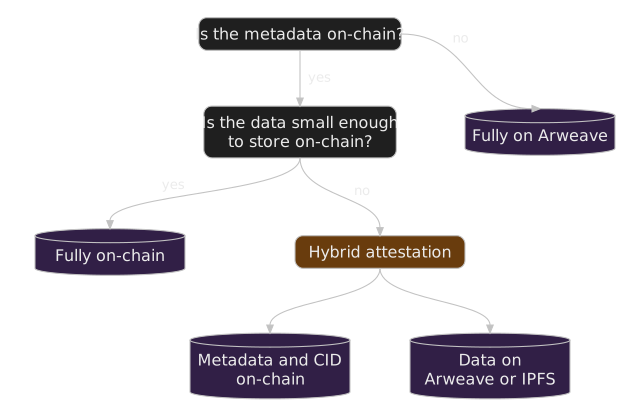
Each schema and attestation records where its data is stored in its dataLocation field: ONCHAIN, ARWEAVE, IPFS, or CUSTOM (see DataLocation). In practice there are three models.
Fully on-chain
The schema or attestation and all of its data are written to a Sign Protocol contract on a supported chain: EVM chains, Starknet, Solana, or TON. Create them directly through the ISP contract or the SDK in on-chain mode.
Fully Arweave
The record and its data are stored on Arweave. These attestations are created through the Sign Protocol API, using the SDK in off-chain mode; the storage is paid for through the Sign Developer Platform. SignScan indexes them like on-chain ones.
They differ from the contract-level OffchainAttestation, which stores only a record on-chain while the data stays on other servers.
Hybrid attestations
Hybrid attestations are standard on-chain attestations whose data is stored off the current blockchain network, for example on Arweave or IPFS. The metadata and schema information stay in the Sign Protocol smart contract. The attestation data is uploaded to Arweave/IPFS, and the resulting CID is encoded and stored in the attestation's on-chain data field.
Use hybrid attestations when the data is large enough that gas fees would be high, or when front-end clients need easy data access. Projects can cache CIDs for quick data retrieval instead of querying, fetching, and decoding data every time an attestation is retrieved.
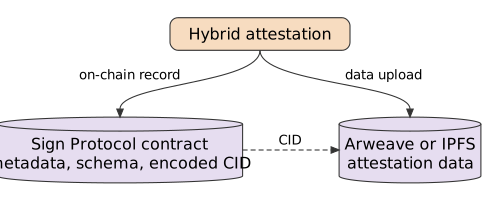
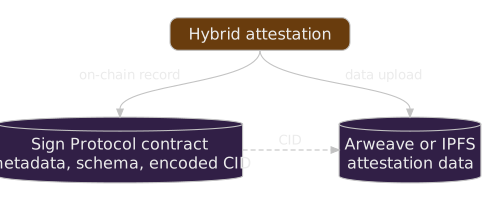
Sign Protocol's SDK supports hybrid attestations directly. In the Schema Builder, build a hybrid schema by choosing an on-chain schema with Arweave or IPFS as the data storage location.
Creating a hybrid attestation from a contract
- Upload the attestation's data to the storage location (Arweave/IPFS) in JSON format.
- Encode the returned Content ID (CID).
- Create an attestation, passing in the encoded CID as
data.